Debouncing in Javascript.

While designing web applications, we need to optimize for certain scenarios, where we don't want to call a function repeatedly multiple times.
An example of this could be, a callback function that is executed on window resize or a scroll event. And let's say on top of this, the callback was also making an XHR request. A scenario like this could temporarily freeze up the browser and thus deteriorating the user experience.
A practical example of this is the search bar in most of the popular eCommerce web applications. Here we don't want to make a network request on every keystroke the user is typing to fetch the results. We want the user to finish typing and then wait for a specified window of time to see if the user is not going to type anything else or has finished typing and return the result.
In the below screenshot, you can see, even though I've typed 5 words, 2 new network calls being made. (The first one shown below was made on onfocus event).
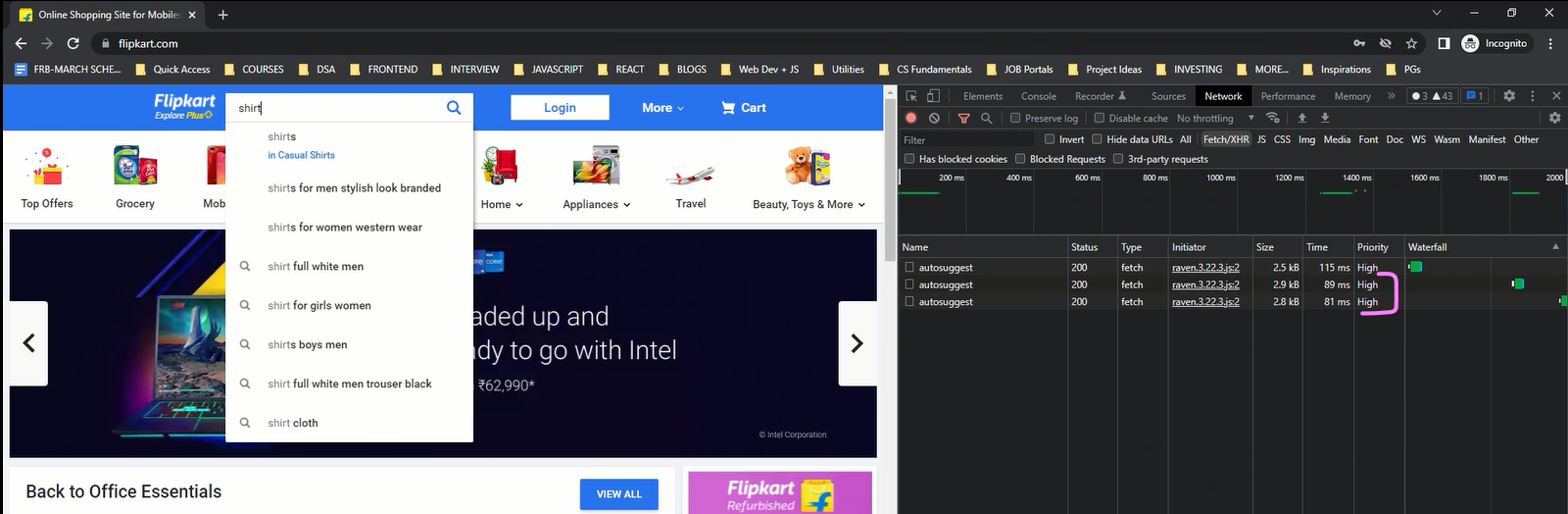
To solve such a problem for optimizing the web app, we've got a technique called Debouncing.
1. What is Debouncing?
Debouncingis a term taken from Electronics and one of the first articles' about it's use in Web App Development was by John Hann in his blog Debouncing Javascript Methods. So according to him, 'Debouncing ensures that exactly one signal is sent for an event that may be happening several times — or even several hundreds of times over an extended period. As long as the events are occurring fast enough to happen at least once, in every detection period, the signal will not be sent!'- So in terms of programming, Debouncing is an optimization technique that ensures, a function is called only once, no matter how many times the event (which is supposed to call the function) is triggered within a specified time frame.
2. Debouncing Implementation
In the following example, on an input tag's keypress event, we've attached an event listener which will make a network call request.
If we simply make the network call on every keypress event, it'll cause performance issues on our website.
So in order to reduce the total number of network/function calls being made, we'll use the debouncing method shown below.
const input = document.querySelector("input");
input.addEventListener("keypress", debounce(getData, 300));

function getData(){
  // some time consuming network call
}

function debounce(fn, delay){
  let timer = null;
  return function debounced(...args){
    const context = this;
    clearTimeout(timer);
    timer = setTimeout(()=>{
      fn.apply(context, args);
    }, delay)
  }
}
So what did we do above?
- In simple terms, we've written the logic that will ensure, that our function
getDatais only called if the user doesn't press any key within the 300 milliseconds timeframe. - To break it further down, in order to fetch the data,
getDatahas to be called, but also we don't want to call this method on eachkeypressevent. So we passed this function to the debounce function and got the debounced version of this function back, which is then attached to the event listener. - Technically we're attaching this
debouncedfunction to the event listener.
So why do we need the debounce function then?
- We need this function to create a closure and have the value of the
timervariable persist between multiple function calls.
Why do we need a closure with timer variable?
- So suppose in the input textbox, I'm typing something.
- On every keypress, this
debouncedfunction will be called. - For Example, If I entered 'abcde', the
debouncedfunction will be called 5 times. First time, when we press 'a', a timer will start for 300ms. That timer id will be stored intimervariable. Next time when I press 'b', again the debounced function will be called, but since we had formed a closure withtimervariable, we'll be able to access the previoustimervalue created in case of 'a'. So we'll first clear that out and then start a new timer. So similarly we'll keep creating new timers and clearing them out, until we reach the last function call. After that since no key is pressed, this timer will complete and finally run ourgetDatafunction. - So to summarize, the
debouncedfunction will be called as many times the event is triggered, but thegetDatafunction will only be called once the user stops typing and there's adelayof 300ms.
What is the debounce function?
- It's a function that ensures that the function passed into it
fn, is called only once within the given time framedelay.
So How Debouncing is working? (Summary)
- It works by issuing a setTimeout at the specified detection period. Each time the function is called the setTimeout is cancelled and issued again. This serves as our detection mechanism but using reverse logic. It/when the setTimeout executes, we know that our funciton was not called within the detection period.
3. Examples
- Scrolling a page.
- Resizing a page.
- An input search box to fetch suggestions.
4. Debounce implementations in libraries
| Library | Example |
| Lodash | _.debounce(getData, 300); |
| Underscore | _.debounce(getData, 300); |


